Background Introduction
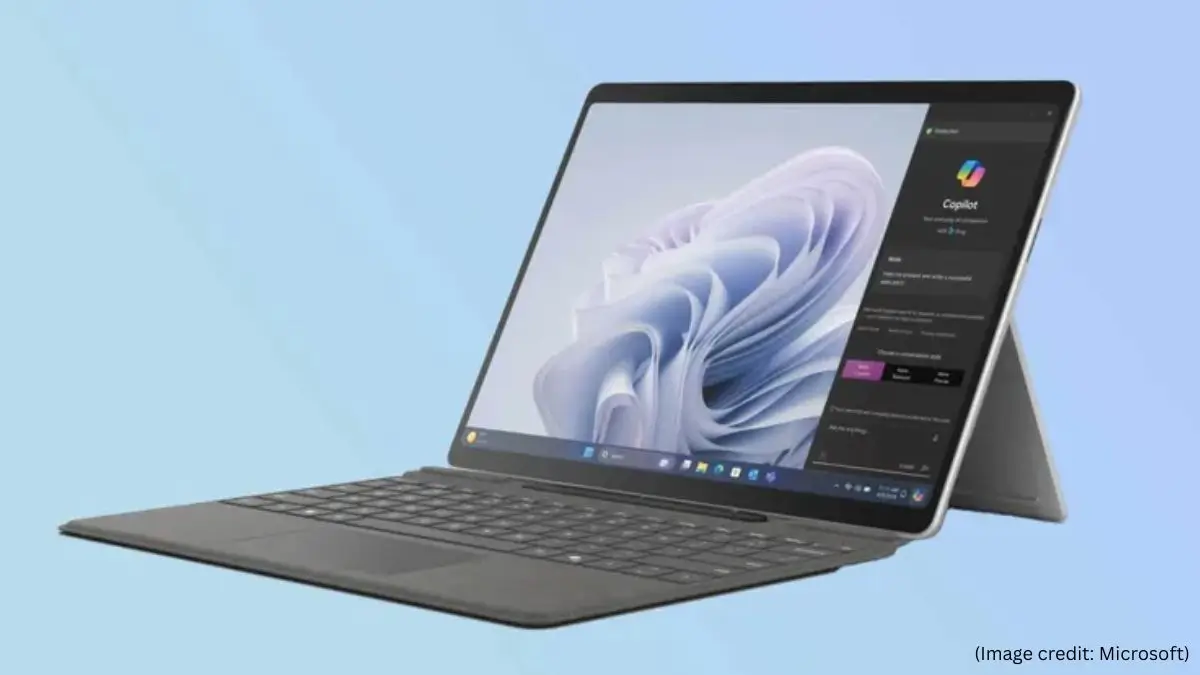
The Microsoft Surface Pro 10 was announced on the 21st of March 2024 and comes with a new and brighter anti-reflective display, Intel Core Ultra processors, and better battery life. As a flagship 2-in-1, it builds on the Surface Pro’s long-standing promise of combining the portability of a tablet with the productivity of a laptop — this time with a sharper focus on artificial intelligence.
Key Specifications
| Feature | Details |
|---|---|
| Processor | Latest Intel Core Ultra CPUs (AI‑optimized) |
| Memory (RAM) | Configurable up to 64 GB |
| Storage | SSD options up to 1 TB |
| Display | 13‑inch PixelSense™ touchscreen, adaptive color, anti‑reflective coating, dynamic refresh rate |
| Camera | 1440p Surface Studio Camera, 114° ultra‑wide field of view, supports Windows Studio Effects (auto‑framing, eye contact, background blur) |
| Connectivity | Wi‑Fi only or Wi‑Fi + 5G models; Thunderbolt 4 ports |
| Security | Windows Hello facial recognition, Enhanced Sign‑in Security (ESS), Dynamic USB‑C disablement |
| Battery | Fast charging (up to 80% in ~1 hour); all‑day battery life (varies by usage) |
| Accessories | Surface Pro Keyboard, Surface Slim Pen 2 (sold separately) |
| Kickstand | Adjustable up to 165° |
| Weight/Design | Thin, lightweight, portable 2‑in‑1 form factor |
Design & Build
The Surface Pro 10 looks almost identical to the previous model, with a premium aluminum chassis that is 9.3mm thin and weighs 879g without the keyboard attached. The top of the fan slots are nicely masked and you can hear the fans when the unit is under load. The familiar folding kickstand is a design highlight, providing a wide variety of viewing angles for desk use or casual viewing. The chassis is made from recycled aluminum, a nod to Microsoft’s sustainability commitments. Connectivity-wise, it has a Surface Connect port on the right for the supplied charger and two USB 4 Type-C ports with Thunderbolt 4 support on the left. The slot for the MicroSD card under the kickstand is gone, as is the headphone jack. However the SSD is replaceable, you just need to unscrew a little screw to access and swap it out.
Display
The 13-inch screen is one of the best things about the Surface Pro 10. It has a 2880 x 1920 resolution and a peak brightness of 600 nits. The panel also has an anti-reflective coating and is considerably easier to use in bright environments than previous generations. Overall, the display is still a big highlight, with a high resolution, adaptive refresh rate, impressive brightness and an anti-reflective coating for better visibility.
Performance And AI Performance
The Surface Pro 10 is the first Intel-powered Surface Pro with AI capabilities, featuring a Neural Processing Unit (NPU) that allows it to run machine learning algorithms such as Windows Studio Effects and Live Captions. Models with the Intel Core Ultra 5 135U, 8GB of LPDDR5x RAM and 256GB of SSD start at $1,199.99, while Core Ultra 7 165U versions start at $1,699.99 with 16GB of RAM. In practice, the device handles seamless multitasking with demanding apps like Adobe Photoshop, Google Chrome with many tabs, and Microsoft Teams simultaneously, while AI tasks like Copilot summaries and background blur on video calls are completed almost instantaneously. That said, it’s not built for demanding AAA gaming or complex video editing workflows, though it has been reported to run professional software like SolidWorks 2024 and Fusion 360 effectively.
Camera
It features a 12.2-megapixel front-facing camera, an upgrade from its predecessor. It has a wide-angle camera and works with Windows Studio Effects, so AI can blur the background or keep you in focus as you move. The back features a solid 10.5-megapixel camera, which can be used to scan documents. The front camera also supports Windows Hello face recognition for quick and secure sign-ins.
Keyboard & Accessory
Microsoft has also released a new Surface Pro Type Cover for the Surface Pro 10 that includes a dedicated Copilot key to quickly summon Microsoft’s AI assistant from the keyboard. The keyboard and pen are still sold separately, a common complaint with the Surface Pro line — accessories that feel essential are not included in the base price. The Surface Slim Pen 2 is compatible with the device and has pressure sensitivity for note-taking and creative work.
Battery Duration
Battery life is a bit of a mixed bag. Microsoft claims up to 19 hours of typical device usage, but real-world testing varies. Some report approximately 12 hours and 19 minutes in the PCMark 10 Modern Office benchmark, while others report as low as 4.75 hours of continuous HD YouTube playback at maximum brightness. But if you are doing heavier work loads, the battery will run down quickly. You can get a full day of general productivity out of it.
Decision
The Microsoft Surface Pro 10 is a polished, capable machine built squarely for business professionals and power users who want a versatile, AI-ready device in a slim and portable form factor. A meaningful step forward, with a bright display, upgraded cameras, Intel Core Ultra processors and NPU integration. The absence of a headphone jack and MicroSD slot, plus the price of key accessories like the keyboard, remain longstanding frustrations. If you want a premium portable workstation that can run professional software with built-in AI acceleration, the Surface Pro 10 delivers – just don’t expect it to be built for heavy creative or gaming workloads.
Frequently Asked Questions (FAQs)
Is the keyboard included with the Surface Pro 10?
No. The keyboard, called the Type Cover, costs extra, which makes it more expensive. But it is highly recommended, because it turns the tablet into a fully functional laptop.
Can I replace or upgrade the SSD?
Yes. The Surface Pro 10 also features a removable SSD, which is user-swappable without any special tools—just loosen a small screw under the kickstand flap to get to it.
Does it work with the Surface Slim Pen?
Yes, the Surface Pro 10 works with the Surface Slim Pen 2, and it supports pressure sensitivity for writing, sketching and annotating. No pen is included.
Will the Surface Pro 10 play games?
Not really. It can manage everyday productivity and light creative work, but it’s not designed for heavy AAA gaming. It has Intel Arc integrated graphics, which are better suited to office work than hard-core gaming.
Surface Pro 10 charging options?
You can charge it using the magnetic Surface Connect port and the power supply that comes with it, or you can charge it using either of the two USB-C Thunderbolt 4 ports. Supports fast charging with 45W USB-C charger at least.

Digital entrepreneur and content expert I help businesses with AI, SEO and the latest tech trends. I started Silicon Valley Weekly to make complex tech concepts easy to understand and use for business growth. I know a lot about systems and help startups, entrepreneurs and brands navigate the fast-changing world of tech and online marketing.
I build strategies that use data, search optimization, content marketing and AI tools to get visibility, engagement and revenue. I love finding ways for businesses to grow increasing their presence and turning new ideas into successful businesses. My goal is to connect the technology, with practical business use so brands can succeed online.