Introduction
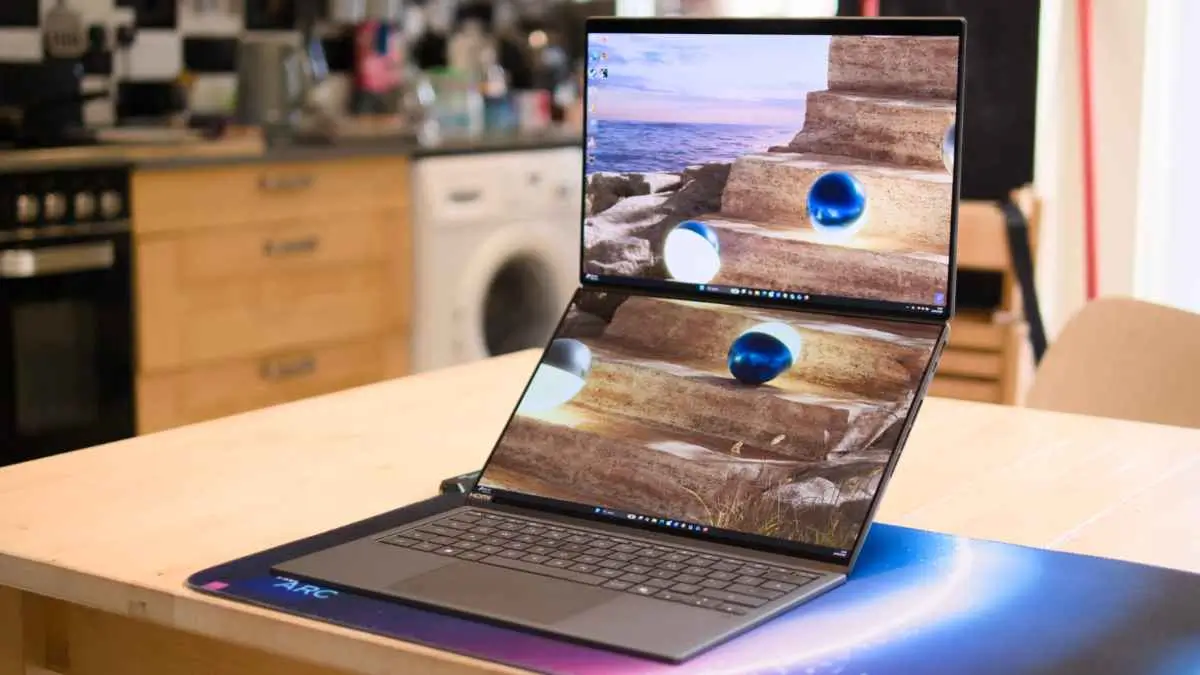
It’s been quite a long time since a laptop concept has stirred up so much interest Asus’s two-screen Zenbook Duo, and the 2026 update officially named the UX8407, really feels like the version that the original idea was waiting for all along. Earlier models attracted attention due to their brave concepts, but they did not the meet the mark in the execution, leaving an uncomfortable split between the two displays and a body that was always felt a bit heavier and clumsier than it should have been. This model directly addresses those old complaints with a wholly overhauled hinge and Intel’s newest Panther Lake chip that finally produces a machine that both looks premium and is not just a mere prototype. The end product is a laptop that inexplicably manages to be a real productivity device as well a preview of the future of portable computing.
Build & Design Quality
It is obvious that Asus seriously focused on the outer look of this generation. for starters, the choice of material in the case was changed to “Ceraluminum”, which is an aluminum alloy that has been put in a mineral-infused water bath, resulting in the surface feeling warmer and more matte than the usual cold brushed metal found on standard ultrabooks. The laptop comes in only one color, but the wordmark carved on the lid is either in Elephant Gray or Moher Gray based on the market, which is a very subtle yet distinctive touch. The biggest design update Yet is the new hideaway hinge that connects the two displays, which drastically reduces the gap between the panels versus the previous generation, transforming what earlier felt like two separate screens awkwardly glued together into something much closer to a single unified surface.
Besides this, Asus has integrated the kickstand as part of the laptop body, doing away with the bulky stand mechanism of the older versions, while still ensuring that the device is firm enough to stand upright in either landscape or portrait mode without wobbling. All these dual-screen tips and tricks have as a compromise the thickness, because the chassis still has to accommodate two full displays and a keyboard that, when hidden, is still inside the chassis, making the Duo quite a bit chunkier than a normal ultraportable, even though Asus has reduced the overall footprint by about five percent compared to the model from last year.
Display and dual screen experience
At the core of the laptop are two 14-inch 3K OLED touchscreen panels, which Asus names Lumina Pro displays. They refresh at 144Hz, which makes everything look very smooth. Besides, a peak brightness of 1,000 nits and anti-reflective coating ensure that even outdoor use is pretty good. With a combined total of almost 20 inches of visual area, the pair is enough for many users to replace their dual-monitor desktop setups, all the while not losing the portability of a single device. The screens can be aligned side-by-side for a widescreen experience, stacked vertically for reading and referring to documents, or split between two people using a feature called Sharing Mode by Asus, which turns the orientation of the upper screen so that a collaborator sitting across the table can see the content properly without having to bend their neck.
In fact, a few models also come with Asus’s Pen 3.0 stylus, which makes the touchscreens serve double as a drawing or marking-up surface for artistic work. The only major disadvantage is that the hinge does not support a 360-degree turn; So, fully tented or tablet modes are not possible. And, a few users found that the touch gesture controls for window management were somewhat tricky and inconsistent during regular use, occasionally even requiring a reboot to fix a stuck input.
Keyboard, Touchpad, Input
Instead of integrating a fixed keyboard at the bottom half of the chassis, Asus has decided to use a detachable keyboard folio which can either rest over the bottom screen in the laptop mode or be completely removed to reveal the second display underneath. The 2026 folio attaches through a newly-designed magnetic pogo-pin connection which not only looks but really feels a lot more secure than the rather loose fitting of previous generations and if remoced for use elsewhere, can also be Bluetooth-paired.
The backlit keys are nicely spaced which allows a good travel for comfortable typing, while the cap finish is done in a fairly rough textured coating which is meant to resist the typical shine and smudging that often occur on glossy keycaps over time. The touchpad is bigger and, under the keyboard, the added multitouch gesture support allows one, three and four finger swipes to be used to unlock shortcuts through the company’s Smart Gestures software. The improved typing experience is a big leap forward compared to the earlier Duo models Still if you’re used to a single-screen clamshell, the overall ergonomic design still needs a bit more getting used to.
Performance and the New Intel Panther Lake Processor
The biggest Zengbook Duo news this year is not at all about its two screens but all about what is going on underneath them. The top-end spec is running on Intel’s Core Ultra X9 388H chip, which is one of the CPUs in the company’s newly launched Core Ultra Series 3 line, the one that was called Panther Lake when it was still in. The 16-core processor can turbo clock up to 5.1GHz and is matched to a 12-core Arc B390 integrated graphics processor. This GPU is based on Intel’s third generation of Xe graphics architecture and is made on a new 1.8-nanometer process, which is a step change in power efficiency compared with the previous generation.
Independent tests revealed the new chip ended up being good in industry-standard benchmarks; it was better than AMD and Qualcomm chips on multi-core workloads but only Apple’s latest silicon was faster for raw single-core speed. The integrated graphics have been Much improved and they are now even capable of running modern games like Cyberpunk 2077 at full HD resolution and decent settings this is something that would have been impossible for integrated graphics just a generation or two ago. The lower-end configurations ditch the Core Ultra 9 or Core Ultra 7 chip for a small four-core version of the same Arc graphics, which will allow the buyers to save money who don’t need the very highest levels of GPU performance.
Battery Life and Everyday Stamina
Dual-screen laptops have always been poor at battery life, and the reasons are pretty clear, but Intel’s more efficient process node together with a larger 99Wh battery has brought the 2026 Zenbook Duo to a level of performance that really deserves to be called impressive. Independent researchers tested the device and found it capable of playing more than 21 hours of local video on a single charge with only the main display active, which is about twice as much as the original dual-screen Duo was able to do back in 2024. Of course, the figure goes down when both screens are in use simultaneously, but even then, reviewers recorded more than ten and a half hours of continuous use, a time that easily beats many traditional single-screen ultrabooks on the market. Asus’s own statements about multi-day battery life on lighter, sporadic use are quite hopeful, but not wholly out of line considering how the hardware performed during prolonged testing.
Ports, Connectivity and Practical Usability
The unique shape of the Zenbook Duo does not hinder a rather practical selection of ports. The full-size HDMI port on one side, which supports real 2.1 bandwidth, is accompanied by a Thunderbolt 4 USB-C port and a 3.5mm headphone socket. On the other side, there is a second Thunderbolt 4 port offering similar features, On top of a legacy USB-A socket and the power button. As the laptop can be turned around and the screen facing up, the presence of Thunderbolt 4 capability on both sides means that the usual annoyance of having to remember which side has the “good” ports is eliminated.
This year, sound has been enhanced with dual side-firing speakers, as well as a pair of smaller tweeters located near the central hinge, which produce a much richer sound compared to the tinny output of thin laptops. Probably the biggest omission, at least for some creative professionals, is a built-in memory card reader. Also, the laptop’s RAM is soldered to the motherboard, so buyers will definitely want to make sure that they pick the right memory configuration at checkout, as there is no upgrading option later.
Pricing & Configurations
The cost of the Zenbook Duo changes Quite a bit not only across different countries but also based on the configurations. This really goes to show how much Asus considers this model to be a luxury product. Here in the US, review samples have been checked at price points starting at around $2,300 and even reaching a top configuration list price of $3,800. But, sometimes the retailers offer the flagship model at a discount price close to $2,800. In the UK, one can get hold of Core Ultra X9 (the most powerful model) at a price of about 2,500 while a Core Ultra 9 or Core Ultra 7 of lower specification can be had for less money.
Then again, places such as Australia can even lead to more expensive entry level pricing for the top-end spec model, which is Really a clear indication of how the addition of fabulous OLED panels, discrete-class graphics and 32GB of RAM with a complete terabyte of storage can result in a bill that is quite high over a usual single-screen ultrabook. No matter what the exact figure is in a particular market, the Zenbook Duo is Clearly a flagship product that is more of a direct competitor to premium creative and business laptops unlike mainstream consumer ultrabooks.
Conclusion: Who Should Purchase It
With the 2026 Zenbook Duo, Asus’s dual-screen experiment has evolved from being a mere interesting curiosity into a really effective productivity machine. The slimmer hinge, the more robust keyboard attachment and, most importantly, the greatly enhanced battery life have removed almost all the elements that made previous models seem like a compromise, whereas the new Panther Lake CPU enables the internal hardware to actually live up to the ambitious design. Obviously, it won’t suit everyone.
The extra weight, high-end price and also the touch controls which can be a bit tricky at times, are all reasons why casual users may be better off with a standard ultrabook. But those who work remotely, students who have been multitasking with reference materials and writing simultaneously, and creative professionals who have always had to carry around a second monitor just to have more screen space while traveling, will appreciate that the Zenbook Duo at last offers a dual-display experience that no longer comes across as a mere smart trick, but rather as the future of mobile productivity.

Digital entrepreneur and content expert I help businesses with AI, SEO and the latest tech trends. I started Silicon Valley Weekly to make complex tech concepts easy to understand and use for business growth. I know a lot about systems and help startups, entrepreneurs and brands navigate the fast-changing world of tech and online marketing.
I build strategies that use data, search optimization, content marketing and AI tools to get visibility, engagement and revenue. I love finding ways for businesses to grow increasing their presence and turning new ideas into successful businesses. My goal is to connect the technology, with practical business use so brands can succeed online.